
LCD monitors, including laptop screens, usually perform at best with their native resolution!
Content:
1.) ... Native Screen Resolution is the System-Provided resolution
2.) ... Helpful information on native resolution and screen resolution!
See also : ►► ... DesktopOK FAQ!
1.) Native Screen Resolution is the System-Provided resolution
You do not need to set your monitor to operate at this resolution, but it is usually recommended to make sure you see the sharpest text and images.Sometimes the Native Resolution (Native screen resolution) not corresponds with the real screen resolution, for example at ULTRA-HD. The flat screens (LCD monitors), which also used as screens for laptop, support often higher resolutions and provide the best representation only at certain resolutions.
For this reason, under:
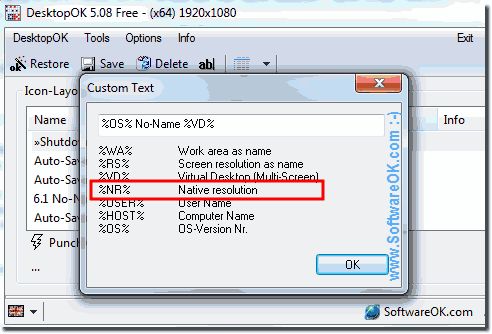
Options ► Save option ► Custom ( ... see picture-1)
See also: ► .. Reduce distances between Windows Desktop Icon!
| (Image-1) Windows and Native Screen Resolution! |
 |

The Windows screen resolution affects the appearance of text and images on the screen. Due to a higher resolution, eg 1920 x 1080 pixels, elements are displayed sharper, the clarity of the text is also better. As they are displayed smaller, more elements fit on the screen. When switching to a lower resolution 1024 x 768 pixels as an example, of course, fewer elements fit on the screen, but they are also displayed larger.
See also: ► .. Reduce distances between Windows Desktop Icon!
The resolution depends on the size and performance of the monitor and the type of used graphics card . For large monitors, the supported resolution is usually larger than for smaller monitors.
