The Scan to PDF Tool for MS Windows 11, 10, ... and Server OS!
Update on: 21 June 2024
Suitable for : Windows 12 & 11, Windows 10, 8.1, 7, ... , Server 2012-2025, 2022, x64, x32, x86
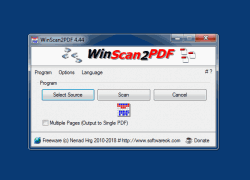
WinScan2PDF allows you to scan documents and save them on your computer as a PDF by using any installed scanner, a windows desktop app for private, office and commercial usage.
Freeware From the Office category on SoftwareOK
Why WinScan2PDF
Are you one of those who only occasionally has to send a signed document to someone by e-mail?
So you don't need a PDF printer driver or some other complex program.
With WinScan2PDF it is no longer necessary! Start the scan directly from this desktop application and save the scanned documents directly as a PDF file on your Windows computer without any detours. The program is very small and easy to use suitable for beginners and advanced users.
Key Features in Win Scan To PDF!
◆ Direct scan the documents and save them as a pdf
◆ PDF multiple pages support
◆ Change the quality of your scanned PDF file!
◆ Auto clean up scanned JPEGs at Program end!
◆ Save the Scans as JPEG file
◆ Suitable for many scanners
◆ Make private pictures safe to PDF
Other possibilities and specifications:
◆ Rotate the scan before going to PDF
◆ Optional translation feature
◆ Freeware
◆ Small in size, great for scanning
◆ Low CPU and RAM usage
◆ Portable scan program
◆ Multilingual
With WinScan2PDF, you do not need virtual printers.
It is also convenient that you can select the option of multi-sided scanning if your document is longer than one page. This tool makes sending documents via e-mail much easier than before, is a very small and portable program for all Windows OS.
# WinScan2PDF Versions History
| New in version 8.88 // 21 June 2024
General optimization in WinScan2PDF and improvements.
Update language files and customization in WinScan2PDF.
| New in version 8.81 // 3 May 2024
Minor fine-tuning and corrections have been made, and WinScan2PDF has been thoroughly tested on the upcoming update versions of Windows 11 and 10.
Additionally, the language files in WinScan2PDF have been updated.
| New in version 8.72 // 12 March 2024
Small improvements for Windows 10 and 11 as well as general optimization.
Updated language files in Win-Scan-to-PDF
| New in version 8.71 // 22 February 2024
Small fine-tuning in the scan to PDF application for MS Windows OS.
Important update of the language files
New language for alternative scan to PDF app: Belarusian
Many thanks to Ivan Meishutovich for the Belarusian language.
| New in version 8.68 // 18 October 2023
Important update of the language files in Win-Scan-to-PDF and small improvements as well as general optimization.
|
... complete Versions History
Supported operating systems
WinScan2PDF is suitable for:Windows 12, Windows 11, Windows 10, Windows 10 Pro, Windows 10 Enterprise, Windows 10 Home,
Windows 8.1, Windows 8.1 Enterprise and Pro, Windows 8, Windows 8 Enterprise and Pro,
Windows 7, Windows 7 Enterprise, Windows 7 Home Basic, Windows 7 Home Premium + Professional, Windows 7 Starter + Ultimate,
, X64, x86 and x32 all Windows, MS Windows Server 2019, 2016,2012, .
... Turkish Description
| # WinScan2PDF is multilingual and a popular program worldwide: |
Program Keys:
* The Scan to PDF Tool for MS Windows 11, 10, ... and Server OS!
# Images+ # Info+ # Thanks+
|

 DE
DE COM
COM