Make data recovery impossible on Windows 11, 10, ... and MS Server OS!
Update on: 25 May 2024
Suitable for : Windows 12 & 11, Windows 10, 8.1, 7, ... , Server 2012-2025, 2022, x64, x32, x86
BlankAndSecure is a Freeware
tool to securely delete the data! Secure delete files are required to block the recovering of deleted data.
Is a smart tool from the ► category file management on Software OK as a file eraser!
* Key features of the file-eraser for Windows!
◆ Secure delete and Shutdown the PC
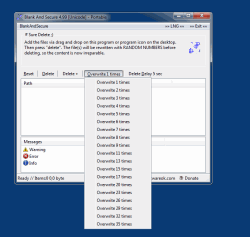
◆ Overwrite the Files 1-32 times with random numbers and delete.
◆ Fill the free HD space with random numbers
◆ Remove the standard deletion tracks from the hard drive
◆ Multiple Renaming of the file to a random name before erase
Other specifications:
◆ Very Small big in Erase
◆ Full Unicode Support
◆ Low CPU and Memory Usage
◆ Drag and Drop Support
◆ Portable
◆ Freeware
◆ Multilingual
◆ etc. ...
About the file eraser for Windows!
Secure deletion is possible with this program, because "Blank And Secure" overwrites the data with random numbers before deleting.
The data recovery is impossible after this operation. So please only use if the data really should be permanently deleted.
The other overwriting standards such as US DoD 5220.22-M ECE, German standard and Peter Gutmann standard is not implemented, because in my test i had no measurable improvement, for that reason is that not implemented in "Blank And Secure"
From Ver. 4.54 on user request the random number generator from NonCompressibleFiles!
How to use "Blank And Secure" the file eraser for Windows!
Add the files or folders via drag and drop on "Blank And Secure" or program icon on the desktop. Then press "delete". The file(s) will be rewritten with RANDOM NUMBERS before deleting, so the content is now irreparable. Press the button "Fill the free space with null" this will remove the standard deletion tracks from the hard drive .
Options:
Reset:
Clear the List Contents (not delete the files).
Delete:
Overwrite folder and files with random numbers and delete.
Overwrite X times:
Overwrite the data X times with random numbers.
Delete Delay X-sec.:
At this time you can stop the erasing procedure with the key [ESC].
Fill the free space with random numbers:
This will remove the standard deletion tracks from the harddrive.
# BlankAndSecure Versions History
| New in version 7.72 // 25 May 2024
Various small adjustments have been made to improve the usability and performance of the tool. This includes optimizations of the user interface and internal processes.
The language files have been updated to ensure that all text and messages are displayed correctly in the latest language versions. This includes correcting translation errors and adding new language content.
These updates aim to make the Secure Delete Tool more efficient and easier to use, regardless of which version of MS Windows you are using.
| New in version 7.71 // 5 April 2024
Made minor improvements in the Secure Delete application for MS Windows 11 and 10, including updating the language files in Blank-And-Secure.exe.
These updates improve the performance and accuracy of the application. It is recommended for all users to install the update to benefit from the latest improvements.
| New in version 7.67 // 15 September 2023
Optimization when deleting files and folders
General optimization in Secure Delete
| New in version 7.66 // 10 August 2023
New code sign certificate for Secure Erase
Important Tests of Secure Erase Tool for Next MS Windows 11 Update
Updates to the language files in Safe-Delete
| New in version 7.55 // 9 May 2023
Small improvements and update of the language data
Verification for the next MS Windows 11 OS build
|
... complete Versions History
| # BlankAndSecure is multilingual and a popular program worldwide: |
Program Keys:
# Operating systems:
The famous free File Eraser and Shredder prevent Recovery from hard disk an safely delete files and folder tool is suitable for Windows 12, Windows 11, Windows 10, Windows 10 Pro, Windows 10 Enterprise, Windows 10 Home,
Windows 8.1, Windows 8.1 Enterprise and Pro, Windows 8, Windows 8 Enterprise and Pro,
Windows 7, Windows 7 Enterprise, Windows 7 Home Basic, Windows 7 Home Premium + Professional, Windows 7 Starter + Ultimate,
, X64, x86 and x32 all Windows, MS Windows Server 2019, 2016,2012, .
# Liated at:
www.filecluster.com // www.portablefreeware.com // www.komando.com
* Make data recovery impossible on Windows 11, 10, ... and MS Server OS!
# Info+ # Thanks+
|

 EN
EN  DE
DE