
It is easy to change the national language in the desktop calendar for MS Windows OS, or to translate it into a new one!Content:
1.) ... Changing the language in the desktop calendar for all MS Windows OS!
|
| (Image-1) Change the default language in the desktop calendar for MA Windows OS! |
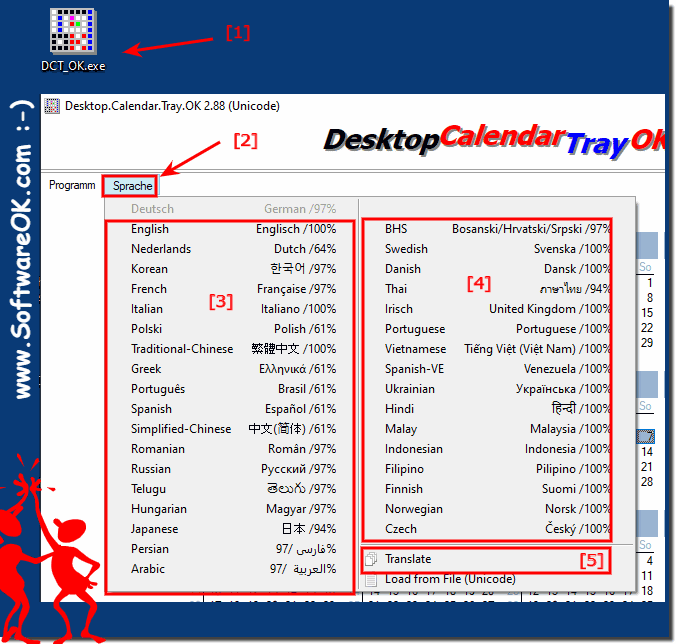 |

2.) What languages are supported in the desktop calendar?
| # Desktop.Calendar.Tray.OK is multilingual and a popular program worldwide: |
| Language | % | Translator Name | |
| 1 | Deutsch / German | 100 % | Jadran Rudec |
| 2 | English / Englisch | 100 % | Nenad Hrg |
| 3 | Nederlands / Dutch | 54 % | A. Van Landschoot |
| 4 | Korean / 한국어 | 86 % | VenusGirl💗~ |
| 5 | French / Française | 100 % | Drake4478 |
| 6 | Italian / Italiano | 100 % | bovirus |
| 7 | Polski / Polish | 100 % | zbymal |
| 8 | Traditional-Chinese / 繁體中文 | 100 % | Danfong Hsieh |
| 9 | Greek / Ελληνικά | 86 % | geogeo.gr |
| 10 | Português / Brasil | 52 % | José Carlos Taveira de Souza |
| 11 | Spanish / Español | 52 % | Erik Bakker |
| 12 | Simplified-Chinese / 中文(简体) | 86 % | KW |
| 13 | Romanian / Român | 84 % | Eugen ANTAL |
| 14 | Russian / Русский | 84 % | Valerij Romanovskij |
| 15 | Telugu / తెలుగు | 84 % | బ్రహ్మచారి భానుచైతన్య |
| 16 | Hungarian / Magyar | 84 % | Borbás András |
| 17 | Japanese / 日本 | 84 % | Shōgun 将軍 |
| 18 | Persian / فارسی | 84 % | Mohamed 2020 |
| 19 | Arabic / العربية | 84 % | Mohamed 2020 |
| 20 | BHS / Bosanski/Hrvatski/Srpski | 84 % | Haris Hrnjic |
| 21 | Swedish / Svenska | 86 % | Mr. Swed |
| 22 | Danish / Dansk | 100 % | tskalshoej |
| 23 | Thai / ภาษาไทย | 86 % | Chanchana |
| 24 | Irisch / United Kingdom | 86 % | Brexit |
| 25 | Portuguese / Portuguese | 86 % | Ronaldo C. |
| 26 | Vietnamese / Tiếng Việt (Việt Nam) | 86 % | Huy |
| 27 | Spanish-VE / Venezuela | 86 % | Ricardo A. Rivas |
| 28 | Ukrainian / Українська | 86 % | Mr. Vladimir / Влади́мир |
| 29 | Hindi / हिन्दी | 86 % | The Hindi Man |
| 30 | Malay / Malaysia | 86 % | Washington |
| 31 | Indonesian / Indonesia | 86 % | Indonesian Super Girl |
| 32 | Filipino / Pilipino | 86 % | Abraham Lincoln |
| 33 | Finnish / Suomi | 86 % | Otto |
| 34 | Norwegian / Norsk | 86 % | Norsk-Superman |
| 35 | Czech / Český | 86 % | Mr. Czech |
| 36 | Serbian / Српски | 86 % | Оззии |
| 37 | Bosnian / Bosanski / Hrvatski / Srpski | 86 % | Mujo |
| 38 | Slovenian / Slovenski | 100 % | Jadran Rudec |
| 39 | Flemish / Belgium | 100 % | Pierre VdC |
| 40 | Deutsch-CH / German-Swiss | 100 % | Patrik Studer |
| 41 | Lithuania / Lietuvių | 100 % | Arturas Bajoras |
3.) What should I consider when changing the desktop calendar language?
There is nothing great to consider, you should of course choose the language that you understand and can read, the tool for MS Windows automatically uses the MS Windows standard language as long as it is available in Desktop.Calendar.Tray.OK if not the standard language is English!
Using a desk calendar in the office for commercial purposes has both advantages and disadvantages. Here are some of them:
Advantages:
Increased Efficiency: A desktop calendar can make organizing appointments and tasks much easier. You can manage all important appointments in one place and never miss any important meetings or deadlines.
Synchronization: Many desktop calendar applications allow synchronization with other devices and platforms. This makes it easier to update and access your appointments whether you're at your desk or on the go.
Custom Reminders: Desktop calendar applications often offer the ability to set reminders and notifications for upcoming appointments to ensure you don't forget important tasks or meetings.
Collaboration: Many calendar applications allow you to share calendars, making team collaboration easier. This is particularly useful for planning meetings and projects.
Reports and analytics: Some desktop calendar applications offer reporting tools to help you analyze your time usage and activities to improve your productivity.
Disadvantages:
Cost: Some desktop calendar applications require the purchase of licenses or subscriptions, which may incur costs, particularly in commercial environments.
Dependence on technology: If your desktop calendar crashes or data is lost, it can cause significant disruption. It's important to back up your calendar data regularly.
Learning curve: Launching a new desktop calendar application may require training and some time for employees to get up to speed.
Limited mobility: A desk calendar is usually tied to the workplace. If you are traveling or working from home, access to your appointments may be limited.
Privacy and security: When you use desktop calendar applications for business purposes, you need to ensure that your data is protected and kept secure to minimize privacy and security risks.
FAQ 9: Updated on: 31 October 2023 10:30
