Software-OK
≡... News | ... Home | ... FAQ | Impressum | Contact | Listed at | Thank you |

  
HOME ► Windows Images - QuickTextPaste ► «««« 04 / 07 »»»»

Many variables in quick text paste don't work!


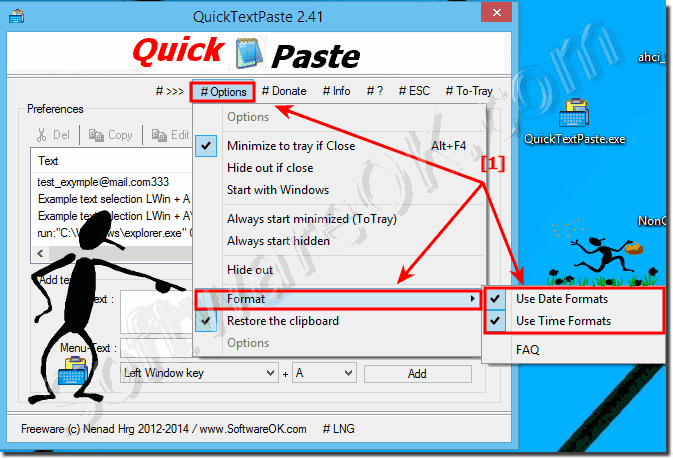
If the date and time placeholder variables for quick text paste on Windows should not work, please activate Date and Time Formats (... see Image-1 )!


Please use always ... the latest version of QuickTextPaste for Windows for free ;-) 

See also: ► Working with date, time and calendar week in QuickTextPaste!
and: ► Date Time Format in QuickTextPaste!

You can find some useful info in ... Quick text paste FAQ  

(Image-1) Date Time Format for Windows in Quick-Text-Paste!
Date Time Format for Windows in Quick-Text-Paste!
▲ Back to the top ▲


Updated on: 25 October 2017 19:51 Windows
Keywords: quicktextpaste, images, many, variables, quick, text, paste, work, date, time, placeholder, windows, should, change


Similar information on the page

Windows

... How to paste images via image path to a active program via clipboard?


The solution in QuickTextPaste is simple to paste Images GIF, PNG, JPG, from path to a active foreground program on Windows 11, 10, via clipboard
Windows

... What does restore the clipboard in QTP for Windows 11, 10, ... ?


QuickTextPaste works with the clipboard, select activate, enable Restore the clipboard feature is very useful on Windows 11, 10, or MS Server OS  
Windows

... How to add commands eg. keyboard shortcut for quick text paste?


It is an easy-to-manage program that lets you insert commonly used text into any program or run ergo start a program whit arguments ►►  please use always
Windows

... send_tab and send_enter command in Windows, how to?


The new command %send_tab% is to send TAB commands to the foreground program, so text forms can be filled better and faster. Info: In short, a tabular command
Windows

... QuickTextPaste does not save the settings, how can I uninstall it?


The solution is simple for QuickTextPaste , if does not save the settings, or if you want to uninstall it from Windows 11, 10, or MD Server OS Content:
Windows

... Timer for Standby, Hibernate prevent on Windows 11, 10, ...


Here is an example how to set the timer and to prevent temporarily the Windows 11, 10, etc. standby, or hibernation see Image-1 Content: 1.
Windows

... Classic and modern address bar for all Explorer Windows, or both together?


You can easy and simple switch from classic to modern Address-Bar, from File Explorer version 7.21 both use on MS Windows 11, 10, to Win XP  The address


▲ Back to the top ▲


See also : ... QuickTextPaste FAQ
Back to : ... QuickTextPaste Homeage

... QuickTextPaste Tip


4ur-Windows-8-Mouse-Balls # AutoHideDesktopIcons # ClassicDesktopClock # Delete.On.Reboot # DesktopDigitalClock # DesktopSnowOK # ExperienceIndexOK # Find.Same.Images.OK # FontViewOK # IsMyHdOK # KeepMouseSpeedOK # MagicMouseTrails # MeinPlatz # PointerStick # Q-Dir # QuickTextPaste # Run-Command # TheAeroClock # WinScan2PDF #


Questions for this:
  1. Many % variables in QuickTextPaste do not work, i.e. they are output unchanged. This applies in particular to all date variables %YYYY% etc., but also %copy_text_lc% and %copy_text_uc%. The only variable (of which I have tested) that works %pptxt%.? What could be the reason?


  + Freeware
  + Order on the PC
  + File management
  + Automation
  + Office Tools
  + PC testing tools
  + Decoration and fun
  + Desktop-Clocks
  + Security

  + SoftwareOK Pages
  + Micro Staff
  + Freeware-1
  + Freeware-2
  + Freeware-3
  + FAQ
  + Downloads

  + Top
  + Desktop-OK
  + The Quad Explorer
  + Don't Sleep
  + Win-Scan-2-PDF
  + Quick-Text-Past
  + Print Folder Tree
  + Find Same Images
  + Experience-Index-OK
  + Font-View-OK


  + Freeware
  + DesktopImages3D
  + WinPing
  + GetPixelColor
  + StressMyPC
  + DesktopSnowOK
  + Delete.On.Reboot
  + IsMyTouchScreenOK
  + Print.Test.Page.OK
  + OpenCloseDriveEject
  + PAD-s


Home | Thanks | Contact | Link me | FAQ | Settings | Windows 10 | gc24b | English-AV | Impressum | Translate | PayPal | PAD-s

 © 2026 by Nenad Hrg ERR2: softwareok.de • softwareok.com • softwareok.com • softwareok.eu
48.301 msec.


>> ☕ Buy SoftwareOK a Coffee ☕ <<


► Difference between CPU (Central Processing Unit) and GPU (Graphics Processing Unit)? ◄
► Keyboard shortcuts to re-start / close Windows-12, -11, -10, -ect. programs? ◄
► Who shouldn't use the small calendar on the Windows desktop? ◄
► Quickly create local user accounts in Windows 11? ◄


This website does not store personal data. However, third-party providers are used to display ads,
which are managed by Google and comply with the IAB Transparency and Consent Framework (IAB-TCF).
The CMP ID is 300 and can be individually customized at the bottom of the page.
more Infos & Privacy Policy

....