Software-OK
≡... News | ... Home | ... FAQ | Impressum | Contact | Listed at | Thank you |

  
HOME ► Windows Tip - Q-Dir ► «««« 12 / 76 »»»»

Access quick links, find the folder in file explorer views, how to!


Access quick links, find the folder in file explorer views, of the Quad-Explorer for Windows!


Content:

1.) ... Manage The Quick-Links Folder!
2.) ... Manage internal Quick-Links!


See also: ► The difference between favorites and Quick links?

1.) Manage The Quick-Links Folder!

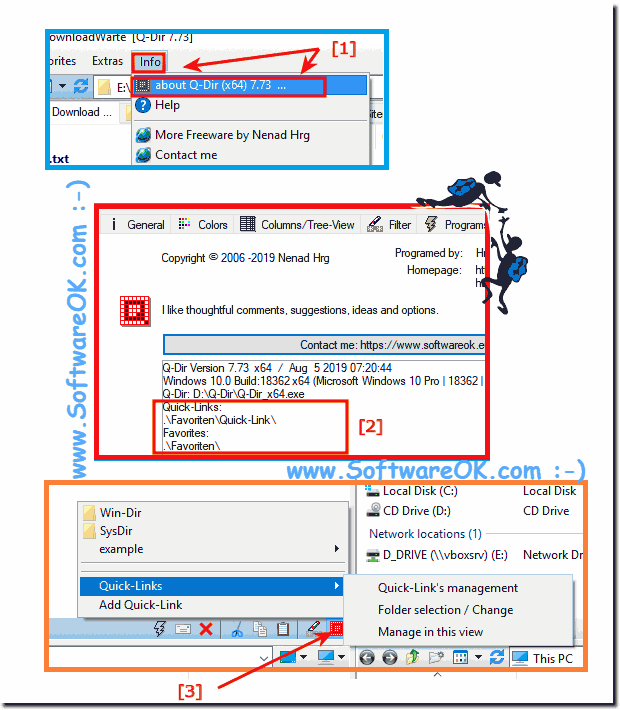
Easy follow the example: (... see Image-1 Point 1 to 3)


(Image-1) Access quick links, find the folder in file explorer views, how to!
Access quick links, find the folder in file explorer views, how to!


However, you can use this example as a solution to "Access quick links or find the folder in file explorer views" without hesitation for earlier Microsoft's Windows operating systems whether it's a Windows desktop, tablet, Surface Pro / Go, or even a server operating system. It has been tested on all and successfully verified.
What can I do if I still have problems when "Access quick links or find the folder in file explorer views" is a frequently asked question Restart the Windows operating system, please perform a proper Windows reboot.  


-
▲ Back to the top ▲


2.) Manage internal Quick-Links!

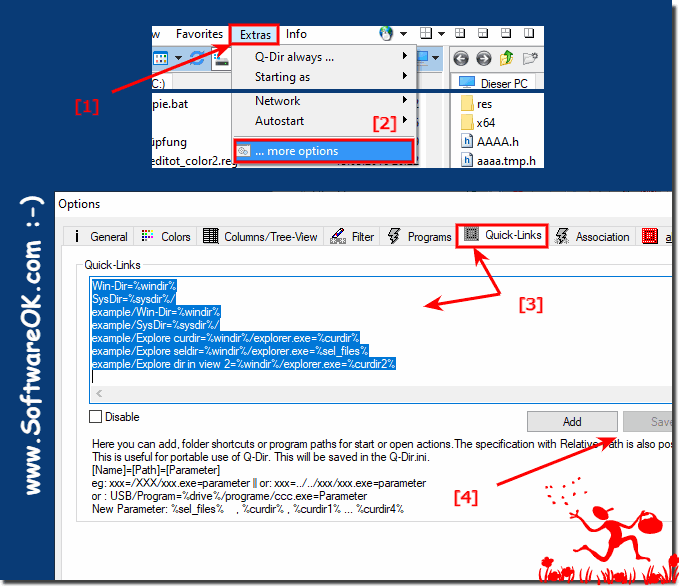
1. Menu > Extras > ... more options 

2. Quick-Links Tab

(... see Image-2 Point 1 to 4)


(Image-2) quick links in Q-Dir!
quick links in Q-Dir!

-
▲ Back to the top ▲


Updated on: 26 August 2023 17:36 Windows
Keywords: access, quick, links, find, folder, file, explorer, views, quad-explorer, windows, 10, 8.1, follow, example


Similar information on the page

Windows

... Give Quad Explorer access to folder protection under Windows 10 / 11


Its easy to grant Quad Explorer access to folder protection under Windows 10/11 or MS Server 2022 and 2019 Many users have problems with Windows folder
Windows

... Print the File Explorer thumbnails to see it on paper


Just print the file explorer thumbnails to see it on paper on Windows 10, 8.1 and MS Server Content: 1. Print Thumbinalis as a picture overview in
Windows

... Quad Explorer Q-Dir as a trusted application under Windows 10


If you want to rank Quad-Directory Explorer Q-Dir as a trusted application on all MS Windows 11, 10 OS Of course, a file manager can not work without access
Windows

... Easily Copy Selected File and Full Folder Paths on all Windows 10, 8.1, ...


It is easy to copy file and folder paths to process them via the clipboard First switch to the folder or directory containing the desired file. The easiest
Windows

... Add Quad-Explorer to the Windows File Explorer folder context menu


To open folders in Q-Dir from MS Windows File Explorer simply activate this option on all Windows Desktops 11, 10, etc. and Server OS   Content: 1.
Windows

... Disable Quick Access in File Explorer on Windows 11, 10, ...


The solution to disable Quick Access in Windows File Explorer on MS Windows Desktop PCs and Mobile on Notebook, Laptops + MS Surface 1. Please start the
Windows

... Find file path in File Explorer on all Windows?


To specify a file path, or folder path on Windows 11, 10, etc.  Finding out in File Explorer, there is an easy way. Its almost as easy as ►►  finding


▲ Back to the top ▲


See also : ... Q-Dir FAQ
Back to : ... Q-Dir Homeage

... Q-Dir Tip


3D.Benchmark.OK # AlwaysMouseWheel # AutoHideDesktopIcons # AutoPowerOptionsOK # ClassicDesktopClock # DesktopDigitalClock # DesktopNoteOK # DesktopOK # DontSleep # Edge-Chromium # ExperienceIndexOK # Find.Same.Images.OK # FontViewOK # GetPixelColor # GetWindowText # Internet # IsMyHdOK # KeepMouseSpeedOK # NewFileTime # OpenCloseDriveEject # OpenGL # PhotoResizerOK # Q-Dir # QuickMemoryTestOK # QuickTextPaste # Registry # ShortDoorNote # StressMyPC # System # TheAeroClock # Tools # Version # WinScan2PDF #


  + Freeware
  + Order on the PC
  + File management
  + Automation
  + Office Tools
  + PC testing tools
  + Decoration and fun
  + Desktop-Clocks
  + Security

  + SoftwareOK Pages
  + Micro Staff
  + Freeware-1
  + Freeware-2
  + Freeware-3
  + FAQ
  + Downloads

  + Top
  + Desktop-OK
  + The Quad Explorer
  + Don't Sleep
  + Win-Scan-2-PDF
  + Quick-Text-Past
  + Print Folder Tree
  + Find Same Images
  + Experience-Index-OK
  + Font-View-OK


  + Freeware
  + NonCompressibleFiles
  + 4ur-Windows-8-Mouse-Balls
  + 12-Ants
  + Q-Dir
  + DirPrintOK
  + FontViewOK
  + MeinPlatz
  + DesktopOK
  + IsMyMemoryOK
  + PAD-s


Home | Thanks | Contact | Link me | FAQ | Settings | Windows 10 | gc24b | English-AV | Impressum | Translate | PayPal | PAD-s

 © 2025 by Nenad Hrg ERR2: softwareok.de • softwareok.com • softwareok.com • softwareok.eu
75.064 msec.


>> ☕ Buy SoftwareOK a Coffee ☕ <<


► Windows installation plus update, how long does it take? ◄
► 3D CPP Links, Info, CPU, Rendering, FPU, OpenGL, DirectX....! ◄
► Change password of a Windows user account using Command Prompt? ◄
► Who benefits most from the memory (RAM) test under Windows? ◄


This website does not store personal data. However, third-party providers are used to display ads,
which are managed by Google and comply with the IAB Transparency and Consent Framework (IAB-TCF).
The CMP ID is 300 and can be individually customized at the bottom of the page.
more Infos & Privacy Policy

....