Software-OK
≡... News | ... Home | ... FAQ | Impressum | Contact | Listed at | Thank you |

  
HOME ► Windows 10 - Network ► «««« 07 / 14 »»»»

Adjust Internet Explorer 11 privacy and cookies settings on Windows 10!


Under Windows 10 you can adjust the cookies settings very quickly in Internet Explorer!


The elegant cookie setting solution is not only written for Windows 10 , this example can also be used as a cookie solution on earlier versions of Microsoft's Windows operating systems, regardless of whether it is a Windows desktop, tablet, Surface Pro / Go, or even a server Operating system is.


Adjust cookie settings and privacy on W10 IE11!


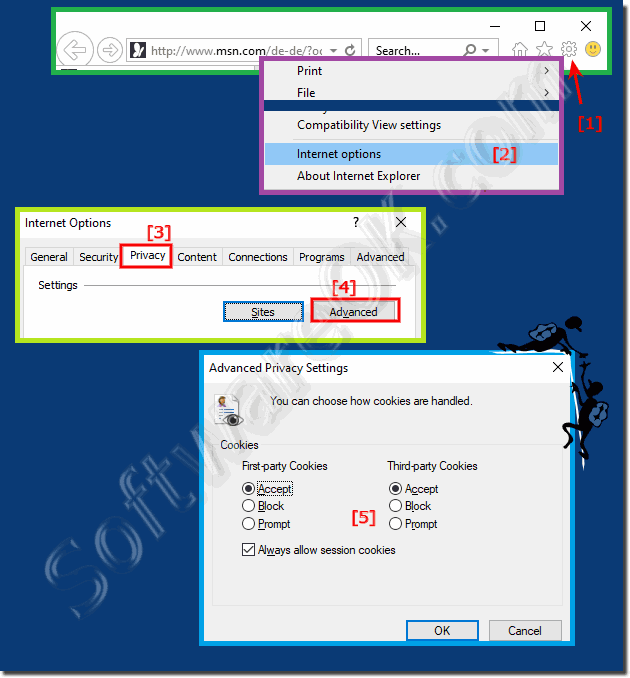
1. Start Internet Explorer

2. Click on the gear icon in the top right corner.

3. Then via "Internet Options".

4. Open the "Data protection" tab and click the "Advanced" button.

5. and adjust the cookie settings individually

(... see Image-1 Point 1 to 5)


(Image-1) Adjust Internet Explorer 11 and cookies settings!
Adjust Internet Explorer 11 and cookies settings!

-
▲ Back to the top ▲


Info:

Make sure that the Override automatic cookie handling check box is selected when the Advanced Privacy Settings window opens. Make sure that first-party and third-party cookies are accepted and click OK to enable cookies. Please close all open browsers before trying again. Enable or disable cookies in Internet Explorer 11. Cookies are treated very differently in Microsoft Internet Explorer 11 on Windows 10 than in older IE versions. This way you can activate or completely deactivate cookies.


-
▲ Back to the top ▲


Updated on: 6 September 2023 18:38 Windows
Keywords: network, adjust, internet, explorer, privacy, cookies, settings, under, windows, 11, 10, cookie, setting, solution, only, written


Similar information on the page

Windows

... FTP download in Windows 11, 10, Explorer Error message


The FTP download in MS Windows 11, 10, Explorer works, with the IE FTP function sometimes an error message appears The security settings do not allow
Windows

... Share documents and images under Windows 10 / 11


Share documents and images under Windows 10 / 11, is the same solution if you share the files Documents and images is only a file type ind the sharing, If
Windows

... Windows 10  / 11 / 12 Adapter Settings Find Network?


It is easy to find adapter settings for Windows under Windows -10 / -11 / -12 to make changes Like Googles smartphone, you can quickly open adapter settings
Windows

... Share files over LAN under Windows 10 / 11


Its easy to share files over LAN on Windows 10 / 11, the easy sharing of files allows this Info: File sharing is a very simple process, but not everyone
Windows

... Help TELNET clients is missing under Windows 11, 10, 8.1, 7 ... why?


It is quite easy to activate the old TELNET client under Windows 11, 10, 8.1, 7 or MS Server 2019, 2016,   By default, the Telnet client is disabled
Windows

... No connection via WiFi / W-LAN under my Windows 10 / 11 Surface, why?


If no connection can be established via WLAN / WiFi under Windows 10 / 11, whether Surface or not If Windows 11 or 10 runs 5 to 10 days at a time, especially
Windows

... NAS and networks are not recognized on the Windows 10 / 11 computer network drive setup?


Problems with NAS network drive setup and networks that are not displayed on the Windows 10 / 11 computer The reason is that after the update to Windows


▲ Back to the top ▲


11 # APPs # Beginner # Desktop # Download # Explorer # File-System # Folder # Hardware # Install # Internet # Media # Monitor # Network # Office # Power-Options # Printer # Quick-Tip # Registry # Search # Security # Settings # Shortcuts # Software # Sound # Store # System # Tips # Update # User #


Questions for this:
  1. IE11 use cookies, like settings, allow the use of cookies with regard to personal data protection.
  2. I want permanent settings in the browser, such as automatically allow or block cookies for all websites?
  3. Need tip to disable cookies in Internet Explorer 11 in Internet Explorer 11, how do I activate cookies in Internet Explorer 11?


  + Freeware
  + Order on the PC
  + File management
  + Automation
  + Office Tools
  + PC testing tools
  + Decoration and fun
  + Desktop-Clocks
  + Security

  + SoftwareOK Pages
  + Micro Staff
  + Freeware-1
  + Freeware-2
  + Freeware-3
  + FAQ
  + Downloads

  + Top
  + Desktop-OK
  + The Quad Explorer
  + Don't Sleep
  + Win-Scan-2-PDF
  + Quick-Text-Past
  + Print Folder Tree
  + Find Same Images
  + Experience-Index-OK
  + Font-View-OK


  + Freeware
  + MagicMouseTrails
  + CpuFrequenz
  + MultiClipBoardSlots
  + OnlyStopWatch
  + KeepMouseSpeedOK
  + NonCompressibleFiles
  + 4ur-Windows-8-Mouse-Balls
  + 12-Ants
  + Q-Dir
  + PAD-s


Home | Thanks | Contact | Link me | FAQ | Settings | Windows 10 | gc24b | English-AV | Impressum | Translate | PayPal | PAD-s

 © 2025 by Nenad Hrg ERR2: softwareok.de • softwareok.com • softwareok.com • softwareok.eu
54.377 msec.


>> ☕ Buy SoftwareOK a Coffee ☕ <<


► Help my Windows 11 has no screenshots, why? ◄
► Can I displays the folder size in Explorer-Views, file extension? ◄
► Edit Q-Dir *.qdr file for a custom start of the quad file explorer! ◄
► Advantages of the alternative command prompt as a Windows application!? ◄


This website does not store personal data. However, third-party providers are used to display ads,
which are managed by Google and comply with the IAB Transparency and Consent Framework (IAB-TCF).
The CMP ID is 300 and can be individually customized at the bottom of the page.
more Infos & Privacy Policy

....