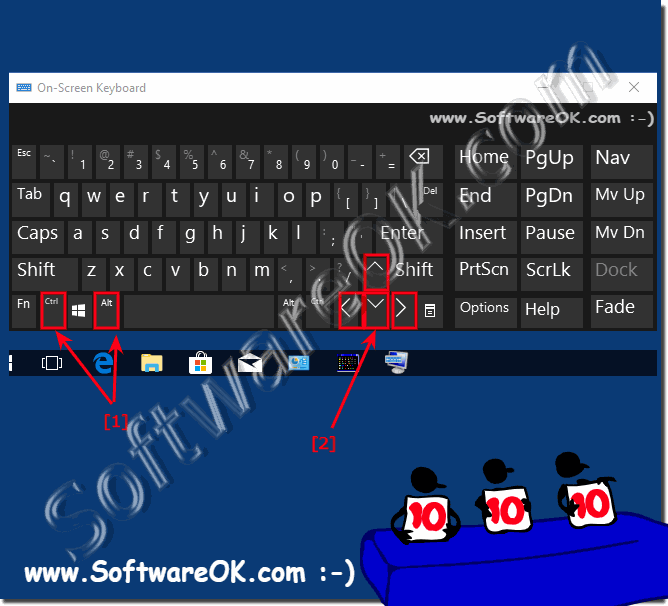
Quick Rotate / Flip Desktop Screen via Keyboard Shortcut on Windows 10 and 8.1!
The solution Quick Rotate Desktop via Keyboard Shortcut on Windows 10 and 8.1 and MS Server OS!
It may have happened during such an action or maybe you just pressed the wrong button, but now the screen of your laptop, notebook or on the MS Surface is rotated or displayed in portrait format even though your screen is in landscape format. Here it is difficult to read the text or to control the mouse properly!
Fortunately, there are several ways to rotate the screen in Windows 10. These methods work on Windows 7, 8, and 10, to how to flip the screen on Windows 10!
2.) What if the screen doesn't rotate!
To rotate the screen on Windows 10, you need to change the screen orientation. Here's how you can do it:
1. Right-click on an empty area of the desktop. A context menu should appear.
2. Select “Display Settings” from the context menu.
3. In Display Settings, scroll down until you find the “Screen Orientation” option.
4. Click the drop-down menu next to “Screen Orientation.” Here you can select the desired orientation, for example “landscape” or “portrait”.
5. After selecting the desired orientation, click Apply to save the changes. Your screen should rotate accordingly.
6. If the screen does not automatically reload after changing the orientation, confirm the change when prompted.
Please note that not all graphics card drivers or monitors support rotating the screen to any desired orientation. In some cases, certain orientations may not be available.
If the screen goes too fast again on or off the Windows 10/11 PC it could be due to the mouse You do not have to instantly access practical third party
Working on the desktop can be improved if you place the second monitor under Windows 10/11 correctly Windows 10/11 is packed with features and settings
Under Android and Appels iPhone there is the night mode and since Android 7.0 under Windows 10/11 there is also the brightness setting A handy feature that
It is easy to start Googles Chrome via desktop or quick launch bars via shortcut under Windows 11, 10, .. Desktop and MS Server Anyone who likes to use
To rotate your screen on Windows 10 not right click on desktop shortcut?
You can rotate the screen to portrait or upside-down landscape?
Ctrl + Alt + Arrow keys don't rotate the screen at all screen orientation in the Display settings if you want to rotate your screen but keys is not working.?
Rotate screen windows 10?
How to Flip the Screen under Windows 10 (Upside Down)?
How to Rotate Screen on Windows 10?
Problem with Auto rotate screen on Windows 10 PC, Upside down screen?
The direction it rotates the screen to depends on what ...?
How to rotate display screen in Windows 10 shortcuts and How to Change Windows 10 Screen Rotation?
Laptop and Desktop Screen Rotation Windows, how to flip or rotate the screen on a Windows computer?
Windows 10 rotate screen 90 degrees shortcut?
How do I rotate screen 90 degrees in Windows 10?
How to rotate screen on laptop?
Methods to rotate screen on windows 10 computer?
How to rotate screen on mac?
How to Rotate Screen in Windows 10 on Laptop?
Hepl i hit CTRL + ALT + Up Arrow and your Windows desktop should return to landscape mode.?
Rotate Screen with a Keyboard Shortcut?
How to rotate screen on Windows 10?
How to Rotate the PC's Screen can I Fix Sideways Screen?
Rotate screen in WIndows 10 i want to see my pc screen on mirror?
How to rotate screen on chromebook?
While you're on any screen, press Ctrl + Alt + any Arrow key and it'll rotate your screen.?
Flip screen horizontally windows 10?
How to rotate Screen on Windows 10, down Arrow Key will map your display rotated?
How To Rotate The Screen In Windows 10 Help?
How do I rotate my screen?
How to rotate the screen in Windows 10?
How do you flip your computer screen horizontally?
Why can't I flip my computer screen, About Featured Snippets?
How to flip the screen on Windows 10 - Accessibility feedback?
Nvidia rotate screen hotkey?
How to fix upside down screen in Windows 10?
How to Rotate and Flip Your Computer Screen?
Tutorial : How to Rotate the screen in Windows 10?
How to rotate screen using keyboard shortcut on tablet, surface pro or laptop and also on desktop use keyboard shortcuts?
This website does not store personal data. However, third-party providers are used to display ads, which are managed by Google and comply with the IAB Transparency and Consent Framework (IAB-TCF). The CMP ID is 300 and can be individually customized at the bottom of the page. more Infos & Privacy Policy ....