Software-OK
≡... News | ... Home | ... FAQ | Impressum | Contact | Listed at | Thank you |

  
HOME ► Faq ► FAQ - Glossar ► ««« »»»

What is Num Lock?


Num Lock, short for "combination lock", is a function of PC keyboards from the first IBM PC to save space on the keyboard!


The keys on the numeric keypad have a dual role as numeric keys and cursor keys. To switch modes between them!

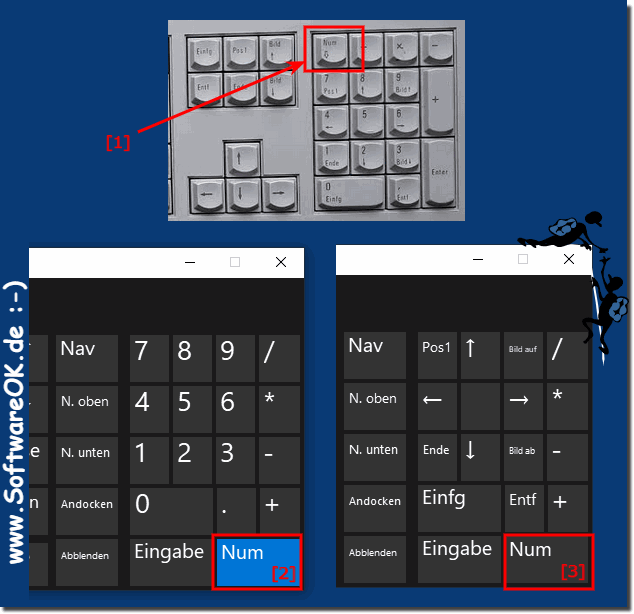
Here is an example of a typical position of the numeric keypad and the Num-Lock function on a desktop keyboard and in the on-screen keyboard under Windows!

( ... see Image-1 Point 1 to 3 )

When the Num key is activated, the numeric keypad on a desktop PC works like a keyboard with numbers and symbols such as: *, /, +. to perform math operations. When the Num Lock key is deactivated, the keyboard is registered as cursor keys, such as the up and down arrows, and some editing keys, such as Home and Insert.


1. 📜 History of the Num Lock key
2. ✅ Advantages of the Num Lock key
3. ❌ Disadvantages of the Num Lock key
4. ⌨️ Is Num Lock still relevant?
5. 🔮 Future of the Num Lock key
6. 📌 Quick summary (to take away)


(Image-1) Num lock on the keyboard!
Num lock on the keyboard!

-
▲ Back to the top ▲


1.) 📜 History of the Num Lock key


The Num Lock key originated in the early 1980s with the introduction of the IBM PC/AT keyboard (84 keys). At that time, keyboard space was at a premium, and the goal was to combine cursor movement (arrow keys) with a separate numeric keypad. The solution: The right-hand key block was given a dual function, switchable with Num Lock.

In the 1990s, the expanded keyboard layout with 101/102 keys became standard. This layout featured separate arrow keys and cursor blocks. Nevertheless, the numeric keypad with Num Lock functionality remained – primarily for compatibility reasons with older applications and for users who frequently work on computers, such as accountants or programmers.

Interestingly, on many laptops today, the Num Lock function is only available as a second-level function (via the Fn key) because they lack a dedicated numeric keypad.


2.) ✅ Advantages of the Num Lock key


AdvantageDescription
Platzersparnis Especially on compact keyboards (e.g., 75% layouts), it combines number and navigation keys.
Fast data entry For spreadsheets, accounting, or number entry, the number pad is more efficient than the top row of numbers.
Additional key assignments When switched off, additional navigation keys are available (e.g., Home, End) – useful for some special applications.
Universal compatibility All common operating systems (Windows, Linux, macOS) have supported this feature for decades.


3.) ❌ Disadvantages of the Num Lock key


DisadvantageDescription
Confusion for casual users Many people don't know why the number key suddenly makes an arrow.
Default setting is not uniform On desktop PCs, Num Lock is often enabled by default (number mode), but on many laptops it's disabled (navigation mode). This leads to inconsistencies.
Additional key as a source of error Unintentional key presses during input can lead to frustration (e.g., "Why is no more number coming out?").
Less important with separate arrow keys Since dedicated arrow keys have been introduced, the navigation function of the numeric keypad is mostly superfluous.


4.) ⌨️ Is Num Lock still up-to-date?


It's a mixed bag. For purely office work involving a lot of number input (Excel, ERP systems, point-of-sale systems), the numeric keypad with Num Lock activated is still very much up-to-date – it significantly increases typing speed.

However, for everyday word processing, programming (where numbers are less frequent), or simple navigation, Num Lock has become superfluous , as separate arrow keys and scroll bars are available.

On compact keyboards without a dedicated numeric keypad (e.g., 60% keyboards, many laptops), Num Lock is merely a secondary function accessed via the Fn key – there, it's a necessary compromise for the few users who occasionally need to type numbers. For most, it's more of a hindrance.

In short: On full-fledged desktop keyboards with a numeric keypad, yes – it's appreciated by frequent typists. On mobile devices and compact layouts, no – it's more of a nuisance.


5.) 🔮 Future of the Num Lock key


The future looks mixed:

1. Long-term decline:
In the consumer and notebook sectors, Num Lock will gradually disappear. Many modern notebooks no longer have a dedicated numeric keypad, and the combined Fn key combination is becoming increasingly unintuitive.

2. Special niches remain:
In the financial sector, accounting, and industrial applications (e.g., cash register keyboards), the numeric keypad with Num Lock functionality will remain for at least another 10–20 years – the workflows are too firmly established.

3. Software-based adjustments:
Operating systems already offer settings for the default Num Lock configuration (e.g., at system startup). In the future, context-sensitive profiles ("detect whether I'm in Excel or Word") could automatically switch the mode.

4. Alternative input methods: With touchscreens, speech recognition, and external numeric keypads (Bluetooth/USB, connected only when needed), the permanently installed numeric keypad is becoming less and less important. Num Lock will thus become a legacy function
– like Caps Lock . 5. Disappearance from Standard Layouts: Manufacturers like Apple removed the separate numeric keypad from many devices years ago. It's foreseeable that Num Lock will disappear from standard desktop keyboards for home users within 10–15 years. Professional keyboards, however, will continue to offer the function as an option for a long time.


6.) 📌 Quick summary (to take away)


- Invented : 1981 with the IBM PC/AT – to save space

- Advantages : Fast number entry, additional navigation keys

- Disadvantages : Confusion, different default settings, often redundant due to separate arrow keys

- Today : Great for heavy typists in the office – rather annoying for normal users

- Future : Will disappear in the consumer sector, but will survive for a long time in niche markets (finance, industry)


FAQ 219: Updated on: 13 May 2026 09:15 Windows
Glossar

What are password policies?


Password policies are a set of rules that were created to increase computer security The goal is to encourage users to create reliable and secure passwords,
Glossar

What is a Windows Defender Application Guard?


Windows Defender Application Guard is a security tool built into Microsoft Edge that isolates browser sessions from the desktop in a virtual machine HyperV
Glossar

What is a PNG file?


A PNG file is an image format with lossless compression that also has the file extension PNG   Understand the PNG file What are the advantages of the PNG
Glossar

What is word?


Word comes from English and stands for word, but this mostly refers to the word processing program Word, i.e. Microsoft Word Tips for Word: ►►  How to create
Glossar

What is office?


The term office comes from English and means office in German. Office is often associated with Microsoft Office    1. In general, an office is a place or
Glossar

What are spreadsheets?


Spreadsheets are tables or worksheets in a file, which consist of rows and columns, with the help of which data can be sorted, arranged, evaluated,
Glossar

What is bootable drive?


A bootable drive is any USB, SSD, HDD, drive that can be used to start a computer or smartphone   If it is an external drive, it is often used to troubleshoot

»»

  My question is not there in the FAQ
Asked questions on this answer:
Keywords: glossar, num, lock, short, combination, function, keyboards, keyboard, keys, numeric, keypad, Questions, Answers, Software


  + Freeware
  + Order on the PC
  + File management
  + Automation
  + Office Tools
  + PC testing tools
  + Decoration and fun
  + Desktop-Clocks
  + Security

  + SoftwareOK Pages
  + Micro Staff
  + Freeware-1
  + Freeware-2
  + Freeware-3
  + FAQ
  + Downloads

  + Top
  + Desktop-OK
  + The Quad Explorer
  + Don't Sleep
  + Win-Scan-2-PDF
  + Quick-Text-Past
  + RAMagic
  + DesktopDigitalClock
  + Find Same Images
  + Print Folder Tree


  + Freeware
  + IsMyMemoryOK
  + StressTheGPU
  + Brightness.Manager.OK
  + PaintOkay
  + MediaPlayerOK
  + FlyOutBriefcase
  + StaticDesktopRuler
  + FlyOutNotePad
  + FreeCellOK
  + PAD-s


Home | Thanks | Contact | Link me | FAQ | Settings | Windows 10 | English-AV | Impressum | Translate | PayPal | PAD-s

 © 2026 by Nenad Hrg softwareok.de • softwareok.com • softwareok.com • softwareok.eu
40.592 msec.


>> ☕ Buy SoftwareOK a Coffee ☕ <<


► Prevents the PC from going off or shutting down!  ◄
► User Requests? ◄
► Need program for secure erase of memory cards for Windows 11, 10, ...! ◄
► Questions specifically related to the analysis of locked files? ◄


This website does not store personal data. However, third-party providers are used to display ads,
which are managed by Google and comply with the IAB Transparency and Consent Framework (IAB-TCF).
The CMP ID is 300 and can be individually customized at the bottom of the page.
more Infos & Privacy Policy

....