Software-OK
≡... News | ... Home | ... FAQ | Impressum | Contact | Listed at | Thank you |

  
HOME ► Windows 10 - Internet ► «««« 03 / 16 »»»»

Clear (clean) Microsoft Edge browser cache!


It is easy to clear or clean the browser cache in the popular Microsoft Edge Internet Browser!


Microsoft Edge freezing may occur due to your browser cache. One of the easiest ways to fix this is to clear the cache. You have to do the following steps! Just like the temporary folder in Windows 10, it gets too full.


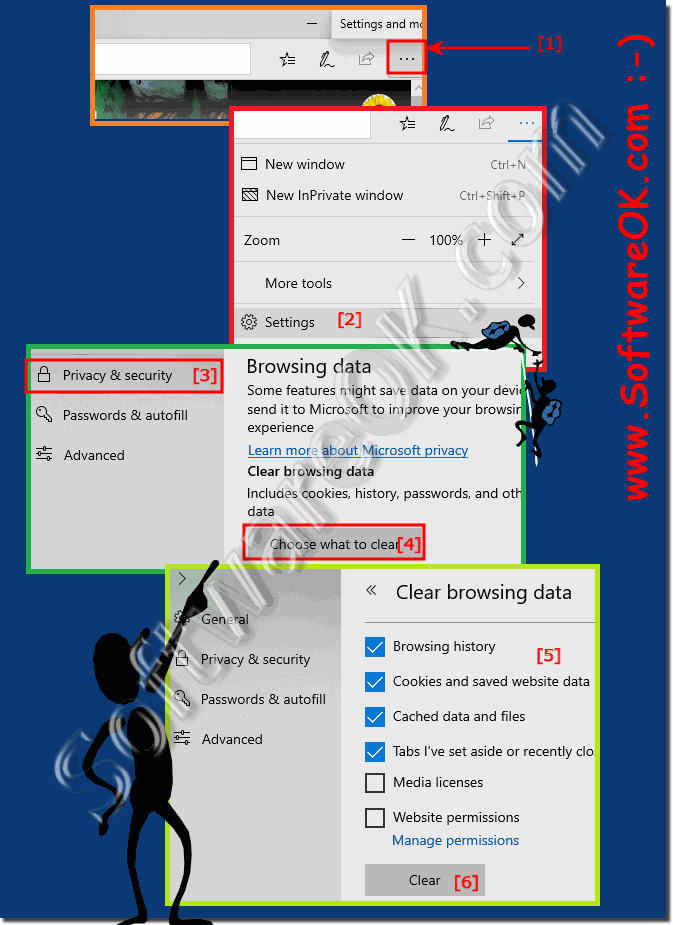
1. Start as usual MS Edge

2. Click on the top right button menu "..."

3. Select the menu settings

4. To delete private data section

5 and click on Choose what to delete.

6. Confirm with the "Delete" button

(... see Image-1 Point 1 to 6)


(Image-1) Easy clear the Microsoft Edge browser cache!
Easy clear the Microsoft Edge browser cache!

-
▲ Back to the top ▲


Updated on: 13 May 2020 17:51 Windows
Keywords: internet, clear, clean, microsoft, edge, browser, cache, easy, popular, freezing, occur, your


Similar information on the page

Windows

... Internet Explorer 11 input bar missing search field, menu


Internet Explorer 11 is a web browser that is included in Windows 10. However, Microsoft Edge is the default web browser in Windows 10 Anyone who has not
Windows

... Disable Google Chrome auto update on Windows 10 or 11?


It is easy to deactivate the Google Chrome auto update on Windows 11/10, but not possible with the portable version If you really need to turn off the automatic
Windows

... Set default search engine and prevent changes on Windows 11/10


Set the default search engine and prevent changes on Windows 11 or 10, especially in the company network, but also at home If you do not use a third-party
Windows

... Clear the temporary Windows 10/11 folder


Its easy to clear ergo empty the temporary Windows 11/10 folder to make more space on the C: drive Deleting the temporary files is one of the best ways
Windows

... The lost Internet Explorer on Windows 10


After installing Windows 10 from Microsoft, many ask where is the old IE internet explorer / browser Windows 11 is without Internet Explorer You do not
Windows

... How do I get letters with accented characters / accents in Microsoft Word?


The solution is really easy to insert letters with accents / accents in Microsoft Word You do not have to  resort to practical third-party  software for
Windows

... Create horizontal line in Microsoft Word, example


Its easy to create horizontal lines in Microsoft Word by using the Auto Format feature It is very convenient to split sections of a document by entering


▲ Back to the top ▲


... Internet Tip


11 # APPs # Beginner # Desktop # Download # Explorer # File-System # Folder # Hardware # Install # Internet # Media # Monitor # Network # Office # Power-Options # Printer # Quick-Tip # Registry # Search # Security # Settings # Shortcuts # Software # Sound # Store # System # Tips # Update # User #


  + Freeware
  + Order on the PC
  + File management
  + Automation
  + Office Tools
  + PC testing tools
  + Decoration and fun
  + Desktop-Clocks
  + Security

  + SoftwareOK Pages
  + Micro Staff
  + Freeware-1
  + Freeware-2
  + Freeware-3
  + FAQ
  + Downloads

  + Top
  + Desktop-OK
  + The Quad Explorer
  + Don't Sleep
  + Win-Scan-2-PDF
  + Quick-Text-Past
  + Print Folder Tree
  + Find Same Images
  + Experience-Index-OK
  + Font-View-OK


  + Freeware
  + AutoHideMouseCursor
  + Desktop.Calendar.Tray.OK
  + OK.Its.Raining.Men
  + Run-Command
  + MagicMouseTrails
  + CpuFrequenz
  + MultiClipBoardSlots
  + OnlyStopWatch
  + KeepMouseSpeedOK
  + PAD-s


Home | Thanks | Contact | Link me | FAQ | Settings | Windows 10 | gc24b | English-AV | Impressum | Translate | PayPal | PAD-s

 © 2026 by Nenad Hrg ERR2: softwareok.de • softwareok.com • softwareok.com • softwareok.eu
54.469 msec.


>> ☕ Buy SoftwareOK a Coffee ☕ <<


► File Explorer search with and without subfolders in Windows 11! ◄
► Large menu with touchscreen on Windows 11? ◄
► Windows 11 update problems? ◄
► Timer for Standby, Hibernate prevent on Windows 11, 10, ...! ◄


This website does not store personal data. However, third-party providers are used to display ads,
which are managed by Google and comply with the IAB Transparency and Consent Framework (IAB-TCF).
The CMP ID is 300 and can be individually customized at the bottom of the page.
more Infos & Privacy Policy

....