View and use the fonts without installing the windows font file?
With FontViewOK
you can display, or use the windows fonts in other programs without install the font file.
In this case, the font is only registered, when you restart Windows it will no longer appear, here you can see how to use the font without installing on Windows 11, 10, 8.1, ... if your font you have downloaded somewhere (often known as .ttf files ) and are not available on the system, as this may not be possible on the system.
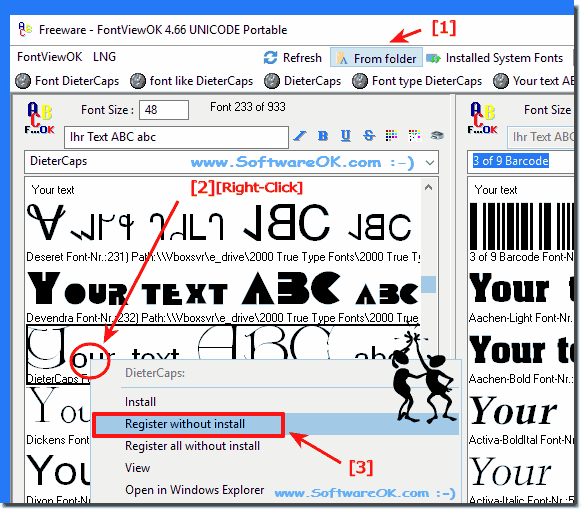
After you select the font with the right mouse button, in context menu simply select the option "Register without install" (see Image-1).
And already, the corresponding non-installed font can be used by other programs, if necessary the program must be started again This is in case for Excel, MS-Word or Other MS-Office Software (2019, 2016, 365, ....).
Image-1: View and use the fonts without installing the font file!
2.) Further information about uninstalled fonts etc.!
There are several ways to view and use fonts without installing the font file on your system. Here are some options:
Online Font Tools:
There are several online font tools that allow you to view and use fonts directly in your web browser without having to download or install them. A well-known example is Google Fonts (fonts.google.com), which offers a large selection of fonts that you can easily integrate into your website or project.
CSS Web Fonts:
You can incorporate fonts into your web page by using CSS rules to retrieve the fonts from the Internet. This allows you to use fonts in your web project without installing the font files on your local system. Here is an example of using Google Fonts in your CSS:
/* In Ihrem CSS-Stylesheet */
@import url('https://fonts.googleapis.com/css?family=Roboto');
body {
font-family: 'Roboto', sans-serif;
}
Online text editors:
If you only want to use a font for a short time, you can use online text editors or design tools like Canva. These tools often offer a variety of fonts to choose from without requiring you to install the fonts on your computer.
Font Preview Software:
There are also font preview software that allows you to preview text in different fonts before installing them on your system. Examples of such software are NexusFont (for Windows) and Font Book
(for macOS).
Fonts in graphic design software:
If you want to use fonts in graphic design software such as Adobe Photoshop or Illustrator, you can display text in the font you want without having to install the font on your computer. The software temporarily renders the font for your project.
Info:
However, keep in mind that most of these methods only allow you to view and use fonts without permanently installing them on your system. If you need fonts for use in desktop applications or for system-wide use, installing the font on your computer is required. This usually requires you to download the font file and copy it to the appropriate directory on your system.
The solution to register all Fonts from a Folder without install to use the Fonts in other Windows Programs, is in FontViewOK very easy at Version 4.07
Many users who have a lot of fonts installed on their Windows operating system would like to compare the fonts visually in the font viewer The dual panel
Help in choosing whether to use the font preview as a portable or non-portable application or to use X64 Between x64 and x32 there are no known differences
Quite simply you can use the recently opened fonts folder to compare the fonts The solution is available in FontViewOK version 5.55, usually it is always
You can easily compare two separate folders even if one of the folders is the SYSTEM fonts folder, whether on Windows 11, 10, etc. Desktop and Server OS
I'm looking for a software that is very simple, with which I can register one or more fonts and these are then automatically removed again on restart, in contrast to the Windows fonts, so please do not install the fonts, but a small tool for this task ?
View uninstalled fonts Windows and display fonts?
Can you use dafont fonts without installing them?
How to use a font without installing it?
How to use the fonts without install?
I like users to add and remove their fonts program, this is not a portable version of the FontViewOK software, I have Font View OK Install rather because I use it regularly and daily I also like to install the font, which is for me It was important that I now not only do a big thing on Windows 10 due to a simple tool without adding fonts, and it is also suitable for deleting fonts.?
Can i use a font without installing it?
View uninstalled fonts Windows and show fonts?
You can also add and remove fonts, after starting I want to register all the "My All Windows Fonts" from a folder I have created, the problem with the registration of several fonts is thus solved and does not burden the system by using the added can be reactivated at the next start, absolutely need such a font tool, where can I find it?
I like users to add and remove their fonts program, this is not a portable version of the FontViewOK software for me, I have installed Font View OK as I use it regularly and on a daily basis, I also like to install the font, which is for me important thing is that now not only on Windows 10 due to a simple tool without making a big deal out of adding fonts and deleting fonts it's also good.?
Use font without installing?
How to view fonts without install?
Preview font without installing free?
Can you also add and remove fonts, after the start I want to register all "My All Windows Fonts" again from a folder I created, the problem with the registration of several fonts is thus solved and does not burden the system by adding the added at the next start again, absolutely need such a font tool, where can I find it?
Show fonts?
How can I view fonts, display fonts or display fonts?
I need a program which can register short term fonts, I would use it to corresponding a desired ttf file which we can always reliably register from any directory as a standard user?
I need a way or a tool that provides an overview of the fonts and can start them automatically I don't need fonts via scripts or the cmd that I then have to add via the command line, then it's not suitable for me, it's a Program that I can download directly from the author's website and is available in 32-bit or 64-bit version, is there such a tool?
How can I view fonts, display fonts or have fonts displayed?
Use a purchased font without installing it?
Windows 7 use font without installing?
I noticed that a font can be installed temporarily - but - this does not work with "install". Surely this means that the font is permanently installed in the Windows system folder. Nothing shows up there.
I need an option or a tool that provides an overview of the fonts and can start automatically. I do not need any fonts via scripts or the cmd that I then have to add via the command line, then it is not suitable for me, it is a Program that I can download directly from the author's website and is available as a 32-bit or 64-bit version, is there such a tool?
Font without installing, or how can I view fonts or show fonts?
How to install ttf file on a computer without installing it?
Install font without, or how can I view fonts or display fonts?
Font software without install?
Integrate new fonts - without installation!
I am looking for a software that is very simple, with which I can register one or more fonts and these then automatically remove when restarting, in contrast to the Windows fonts, so please do not install the fonts, but a small tool for this task ?
I need a program that can register short-term fonts, would I use it to match a desired TTF file that we can always reliably register from any directory as a standard user?