Exclude drives, files, and folders from MS Windows Defender antivirus scans This is not about the Windows Defender Antivirus operating improperly, but being
The function, Hyper-V which is responsible for the virtualization under MS Windows 11 / 10 and Server 2022, 2019, 2016, easy enable or disable For example
Starting Windows-10 takes 12 seconds on my test system: Intel i3-4160 240 GB SSD hard drive. And shutdown 10 seconds. It has to be said that this is a very
The last version of Windows 10 Redstone 4, also known as Creators April 2018 Update, is recognizable in the system as a version number Preface to Redstone
After one of the big auto-updates of Windows 10 or 11, it can get tight on the hard drive. If you want space freed up by Windows 10 / 11 Auto Updates, you
Under Windows 11 and 10, you can indirectly change the font size in programs and this affects all programs on the Microsoft Windows OS Content / Solutions:
Can i Prevent External W!0 Hard Drives From entering in Sleep Mode, how to?
Windows 10 external HD sleep?
Sometime my external Win 10 hard drives, can i prevent this Power Saving sleep feature?
Disable usb disk spin down windows 10?
At between 1 minute and 5 the external hard drives go out and then the hard drive remains inactive as long as I need it in Explorer, how can you switch this off so that the hard drive does not behave when it is inactive?
How to put external hard disk into sleep mode?
Usb harddisk sleep?
How can I disable its Standby, my sata-disks spin down after a while?
Win10 harddisk standby disable?
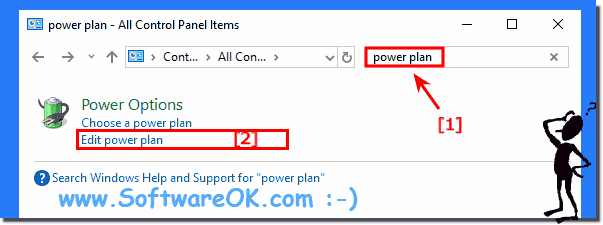
Where can I set the energy in the search field on the start menu so that the energy options or the energy saving plan settings do not switch off the hard disk after a while?
The exter (HD) hard drives enter in power saving sleep mode, how to keep external USB from going to sleeping?
How to change the selectively sleep hard drives in Windows 10?
I have a network of Windows 10 computers and by sharing I have files and it is annoying for Windows to switch off the hard drives with energy saving measures that are too effective, for hard drives with shares this is an inconvenience and access to such shares is delayed or it works only with error messages or the disk takes too long to be available?
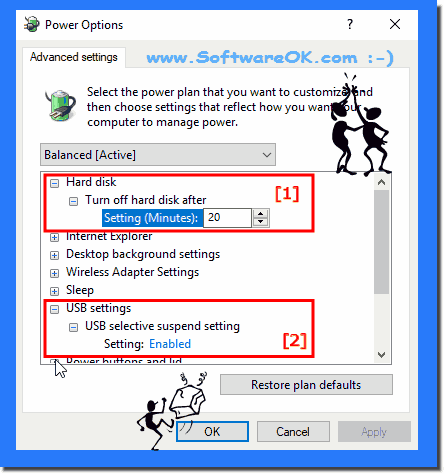
Hellp, Windows 10 putting the external hard drives to sleep, can i Disabling the suspend setting for example in the Power Options of Windows 10 can not found?
Again and again error messages or waiting times for hard drives, what should you adjust in the hard drive settings?
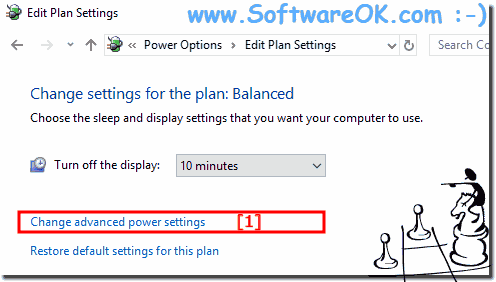
Where are the power settings for the hard drives, can you change that quickly?
How to turn off on Windows 10 the hard drive sleep or can i prevent that hard drive switch to sleep mode?
Hard disk standby?
Stopping the external HDD from turning off'?
Problems with shares on hard disks that shut down?
Where is the turn off switch for SSD hard drive sleep on Windows 10?
Hard drive in system standby?
Spin down usb drives windows 10?
Sometimes HD makes on a external hard drive usb port , sleep can i repair this?
How to set stand by hdd external?
How can I force an internal hard drive, to stop Windows 10 or disable sleep mode on a HD?
Windows 10 software to turn off external drive power savings?
Change the working mode of USB 3 external Hard Drives on Windows 10?
Windows hdd sleep mode?
How to stop a usb drive to enter sleep mode?
When data is released, data is lost because external hard drives run out, can you avoid these problems?
Disable power saving options for hard drives?
Win10 USB power plan selectively suspend condition?
I have a dell laptop. In my advanced settings \ sleep, I only have sleep after and hibernate after. When I connect a smartphone or an extern disk through usb-a/s, my pc sleeps the extern devices after 1mn. How to access to this setting ? Thank you for your help.
Help, with some USB hard drives, the non-sleeping setting has no effect because some models have their own energy management?
Windows 10 keep putting hdds to sleep?
Windows 10 prevent extrnal HDD from stopping?
Prevent external hdd to sleep?
Hard disk runs out is annoying, can I do something when editing MS Office documents, for example?
The energy settings for the hard drives are changed quickly, 240 minutes have proven to be a practical value for hard drives that are used frequently.?